We know that APIs are the backbone of modern applications; they connect your business to customers, partners, and internal systems in real time. Any downtime – even only a few minutes – results in lost revenue, reduced trust, and cascading failures across dependent systems.
With this in mind, high availability (HA) becomes fundamental. Designing for resilience ensures your critical services remain accessible, even when the underlying infrastructure or cloud regions experience disruptions.
MuleSoft CloudHub 2.0 provides an enterprise-grade platform for deploying APIs with built-in capabilities for scalability and security. When combined with Private Spaces, you can design network-isolated, region-specific deployments that serve as the foundation for multi-region, highly available architectures ensuring consistency, reliability, and business continuity.
Understanding CloudHub 2.0 Private Spaces
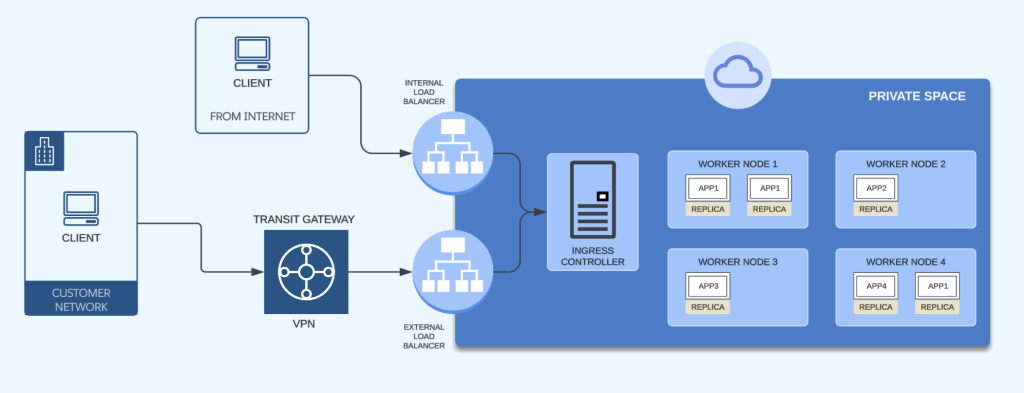
A Private Space is a virtual, private, and isolated network zone within CloudHub 2.0, created in a specific region. It provides a dedicated network boundary, similar to a VPC, where Mule applications run with full control over connectivity, routing, and security.
Within a Private Space, you can configure private networks, define firewall rules, manage DNS resolution, and establish secure connections to your internal systems using Anypoint VPN or Transit Gateway. This setup enables secure, controlled communication between your on-premise or cloud networks and Mule applications deployed in CloudHub 2.0.
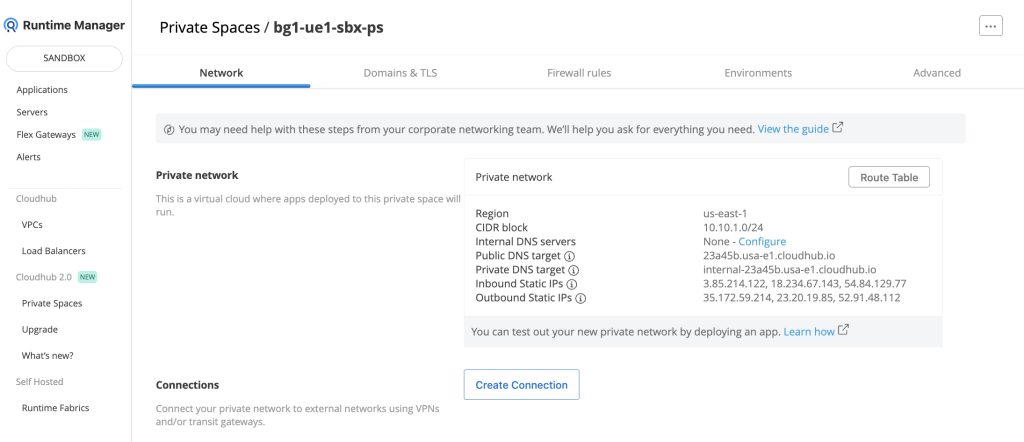
Example configuration
When you create a Private Space, it receives a DNS target name in the format: <space-id>.<region>.cloudhub.io, as in this case: 12a34b.usa-w2.cloudhub.io. If you deploy an app named test-api-v1-dv in that Private Space, its endpoint will follow this format:

Challenges of single-region deployment
While CloudHub 2.0 with Private Spaces offers strong intra-region resilience through replica redundancy and load balancing, relying on a single region still introduces a critical risk: regional outages.
Even highly reliable cloud providers can experience disruptions that affect entire regions. These may result from large-scale infrastructure incidents, power failures, or network interruptions. If all your Mule applications are hosted in one region, an outage can make them completely unavailable, regardless of any internal redundancy you have in place.
Auto-scaling and worker replication protect workloads from local failures but cannot safeguard against a region-wide event. In this setup, the region itself becomes a single point of failure. For organizations delivering critical digital services where downtime directly impacts revenue, customer satisfaction, or compliance, this dependency is unacceptable. Achieving true high availability requires designing beyond a single-region model.
Strategy for multi-region deployment
Building resilience in CloudHub 2.0 involves distributing workloads across multiple Private Spaces, each hosted in a different region. This ensures that if one region experiences a disruption, your APIs continue to serve traffic from another region.
Regional redundancy
Each Private Space operates independently within its region, offering isolated networking and security. By deploying applications in two or more regions, for example, US West (Oregon) and US East (N. Virginia), you eliminate the risk of a single regional outage bringing down your critical APIs. This setup also improves flexibility for regional scaling, maintenance, and compliance-driven deployments.
Custom domain for global availability
Deploying MuleSoft applications across multiple Private Spaces adds regional redundancy, but true high availability requires a unified endpoint. MuleSoft assigns region-specific DNS names that tie traffic to one region. By configuring a custom domain, you can abstract regional dependencies, enable seamless failover between regions, and provide a consistent experience for consumers, a key step toward enterprise-grade resilience.
Global DNS and routing
Because each region has its own endpoint, you need a global DNS service such as AWS Route 53 to present a unified hostname to your consumers. DNS routing policies help you direct traffic intelligently across regions:
- Latency-based routing: Sends requests to the closest healthy region
- Failover routing: Automatically redirects traffic to another region during outages
- Weighted routing: Distributes traffic proportionally or supports gradual rollouts
This abstraction ensures your clients interact with a single, consistent domain while you manage resilience and performance behind the scenes.
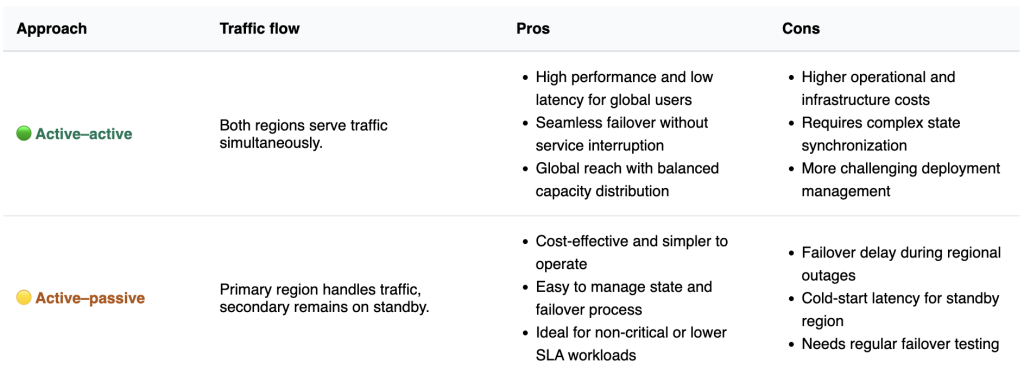
Choose the approach that aligns with your SLA commitments, recovery time objectives (RTO), and recovery point objectives (RPO).
4 steps to set up multi-region Private Spaces
Let’s go through each step you’ll need to set up your multi-region Private Space.
1. Create Private Spaces in multiple regions
Create two Private Spaces in different regions following the MuleSoft documentation: Creating Private Spaces.
- us-west-2 → US West (Oregon)
- us-east-1 → US East (N. Virginia)
TLS configuration: Each Private Space includes a default cloudhub.io TLS context.
For custom domains, upload your keystore and truststore, bind them as a TLS context, and point your domain to the CloudHub-provided FQDN using a CNAME record.

2. Deploy APIs to each Private Space
Deploy your application to each region’s Private Space.

3. Configure global DNS (Route 53)
In your Route 53 hosted zone, create CNAME records for each regional deployment:
- test-api-v1.api.example.com → test-api-v1-abcdef.12a34b.usa-w2.cloudhub.io
- test-api-v1.api.example.com → test-api-v1-abcdef.23a45b.usa-e1.cloudhub.io
Apply a routing policy that matches your architecture:
- Active-active: Latency-based or weighted routing.
- Active-passive: Failover routing with Route 53 health checks.
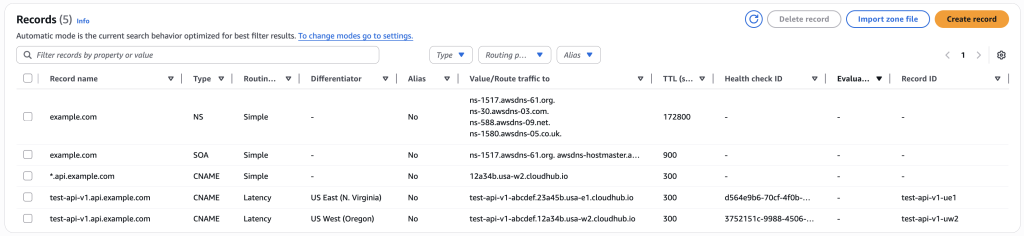
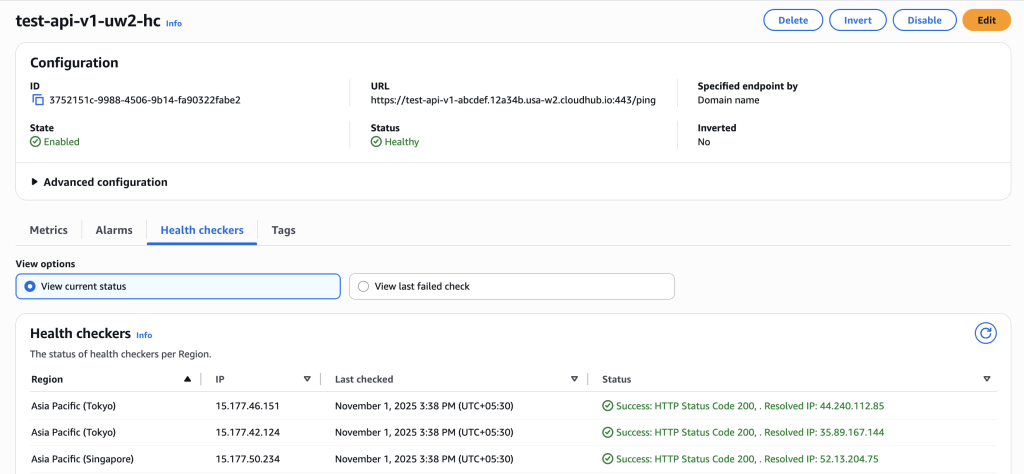
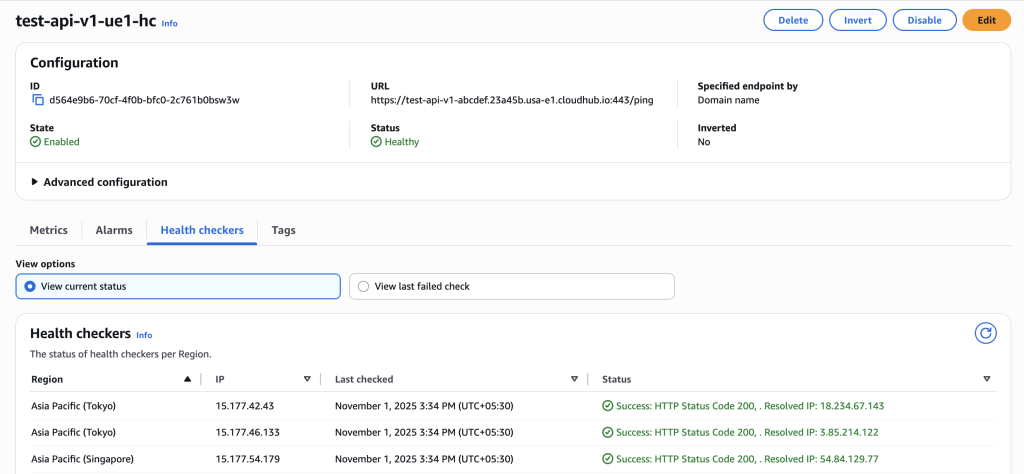
Ensure each endpoint has a health check configured so Route 53 can detect outages and reroute traffic automatically. The following health checks monitor the API endpoints in us-west-2 and us-east-1, ensuring traffic automatically fails over to the healthy region when an outage occurs.
4. Validate and test
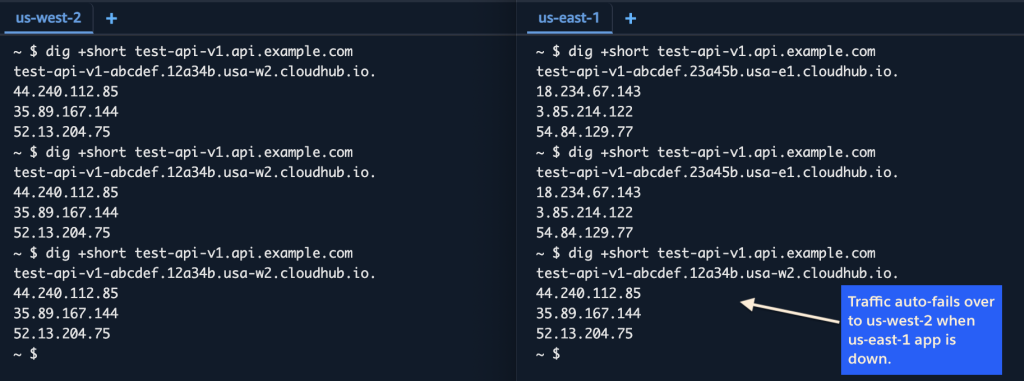
From different geographies, use tools like dig, nslookup, or curl to confirm DNS routing behavior. Verify that your API is accessible via the global hostname and that it routes traffic to the nearest healthy region.
Building for resilience
Designing for high availability in CloudHub 2.0 requires planning beyond a single region. Private Spaces provide the foundation for secure, isolated deployments. When extended across multiple AWS regions with a global DNS layer, they offer true protection against regional outages.
Whether you adopt an active-active model for maximum resilience or an active-passive model for cost efficiency, the goal remains the same, ensuring your APIs stay available despite failures in any single region.
Downtime directly impacts business outcomes. By implementing a multi-region strategy, you strengthen your infrastructure, deliver consistent experiences across geographies, and meet your customers’ and partners’ uptime expectations.