
Agent sprawl is real. Different teams ship agents on different platforms, and without a scalable way to find and track them, you end up with a black box of ungoverned agents trapped in silos. MuleSoft’s Agent Registry already gives you a single catalog for agents from Amazon, Google, Microsoft and more. Until now, getting your Agentforce agents into that same catalog required a manual import – one that someone had to run and re-run every time an agent changed. The new Agentforce Scanner replaces that stopgap with first-class, continuous discovery. Read on to see what the scanner does, why one registry matters, and how to turn it on today.
What is Agentforce Scanner?
Agentforce Scanner is a first-class provider inside MuleSoft. It continuously discovers Salesforce Agentforce agents from a connected Salesforce org and registers them into your registry. Where you previously had to run a manual import and re-run it every time an agent was added, changed, or retired, the scanner does that work automatically. It sits alongside the providers you already use for Amazon, Google, Microsoft, Kong, and GoDaddy, so Salesforce is no longer a special case in your agent inventory.
The scanner reads agent metadata. Agent definitions, descriptions, and capabilities flow into your Agent Registry – no CRM data, no customer records. And because it runs continuously, your registry reflects the state of your Agentforce org in near real time. Your inventory does not drift the moment an admin ships a new agent. With the scanner in place, the workflow you already know in MuleSoft – providers, registry, governance strategies – extends naturally to Salesforce.
Why bring every Agentforce agent into one Agent Registry?
Discovering your agents for reuse is just the beginning. A single Agent Registry turns a fragmented AI landscape into a connected one. It gives you the complete visibility to track agents in real time, and the granular control to govern security and access from one plane. Here is what centralization unlocks.
Unified governance and security
When agents live across different platforms, consistently enforcing governance is nearly impossible. With Agentforce agents cataloged in your registry, you can apply the same Governance Strategies – rate limits, access control, cost management, observability – that already cover your Amazon, Google, and Microsoft agents. One posture, one set of policies, and one audit trail.
Agent-to-agent collaboration
The most powerful AI workflows involve agents talking to other agents. A customer support agent might need to collaborate with a shipping agent to track a package. When every agent is registered in the same registry, you can compose across providers instead of building one-to-one connections between platforms.
An agile, multi-provider tech stack
Modern AI moves fast. You might adopt a new provider to leverage a model better suited for a specific language, reduce latency, or take advantage of better pricing. A first-class scanner for every provider means you can bring new environments in without inhibiting developers and without losing visibility or governance in the process.
Real-time observability
A centralized registry, coupled with monitoring, turns agent sprawl into a visible map. You can see which agents are used most, which are reused, and where the bottlenecks are – across every provider, including Agentforce.
How to add the Agentforce Scanner
Adding Salesforce as a provider is only a couple of clicks. Here is what you need and the exact path to follow.
Prerequisites
- Access Management permissions to configure providers in MuleSoft
- A Salesforce org connected to your MuleSoft tenant via Connected-to-Connected (C2C) trust
- Agentforce enabled in that Salesforce org with agents defined
The scanner rides on the C2C trust that many customers have already established. That means no new credentials, no service account, and no separate identity plane – the trust already exists, and the scanner reuses it.
Add Salesforce as a first-class provider
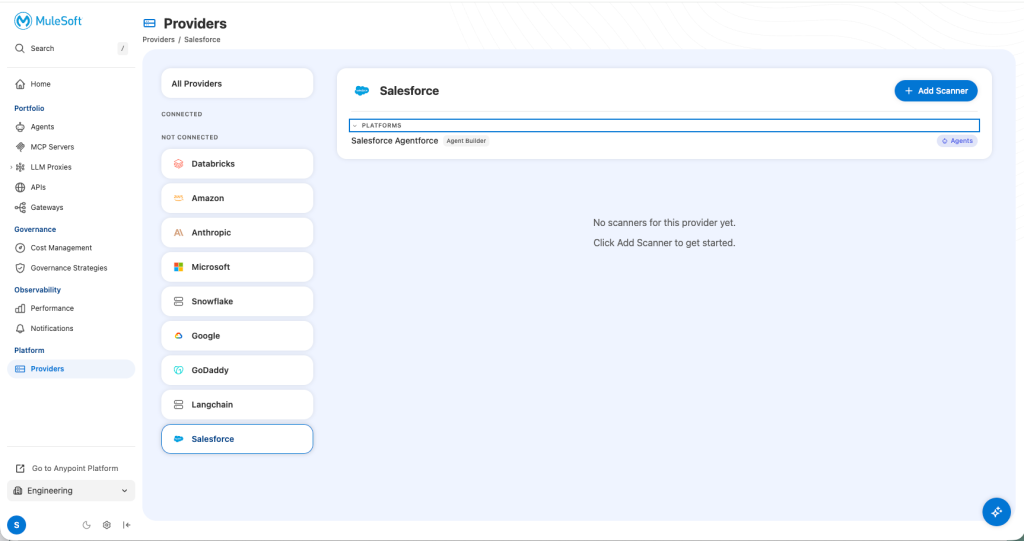
- From the MuleSoft left navigation, open Platform → Providers.
- Salesforce now appears in the picker alongside Amazon, Microsoft, Google, Kong, and GoDaddy
- Select Salesforce → Add Scanner. The org dropdown is populated automatically from the orgs you have already connected via C2C.
- Pick the target org and click Test Connection.
- Provide a Connection Name and Configure the scan schedule (how often the scanner should run)
- Save the Scanner.
Run the scan and see agents in your Agent Registry
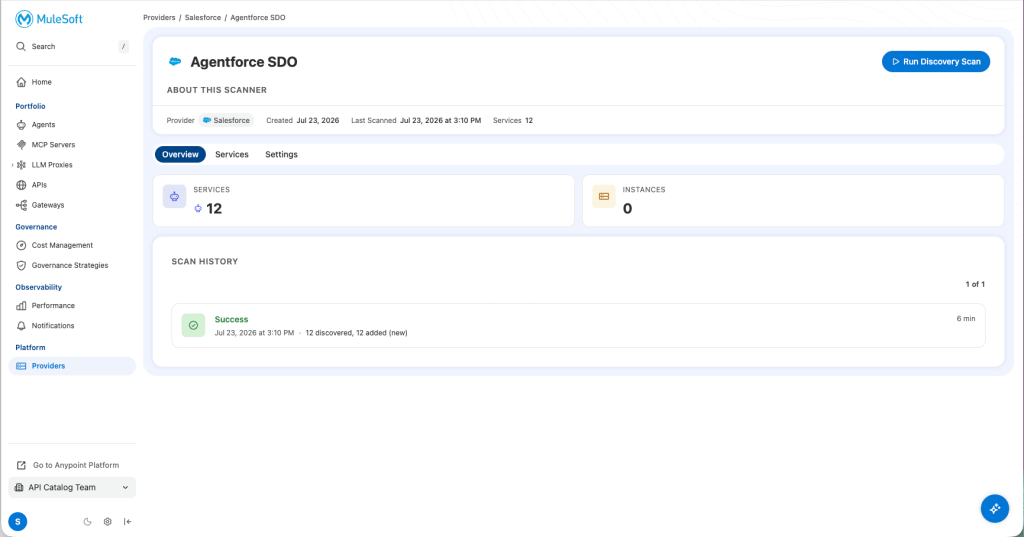
Once you save the provider, the scanner runs on the schedule you configured during setup. To see results immediately, click Run Discovery Scan to kick off a scan on demand.
When the scan completes, the Salesforce provider’s Scan History view shows the run status, the timestamp, and the count of agents discovered – the same audit surface you already use for your other providers.
Open Portfolio → Agents and filter by Provider: Salesforce. Your newly discovered Agentforce agents appear as first-class entries, each carrying its name, description and agent metadata, and the timestamp of the last sync. Clear the filter to see the unified view across Amazon, Microsoft, Google, Salesforce and others together.
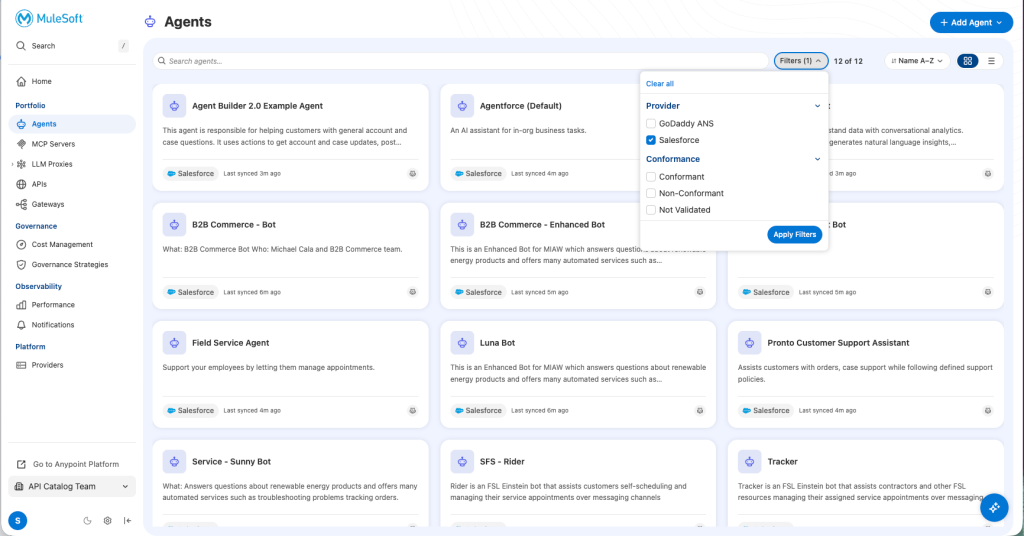
Because the sync is continuous, your registry reflects agent additions, updates, and retirements without anyone re-running an import.
Get started with Agentforce Scanner
Cataloging your Agentforce agents should not be a manual, time-consuming task. With the Agentforce Scanner, you automate discovery across every provider – Amazon, Google, Microsoft, and now Salesforce – so your registry is always accurate and always current. That is the foundation for uniform governance, agent-to-agent collaboration, and observability across your entire estate.
If you’re new to MuleSoft’s Agent Registry and Providers experience, this is the moment to bring Salesforce in from day one. The setup cost is the same, and you skip the “we’ll add Salesforce later” phase that most customers regret.


