
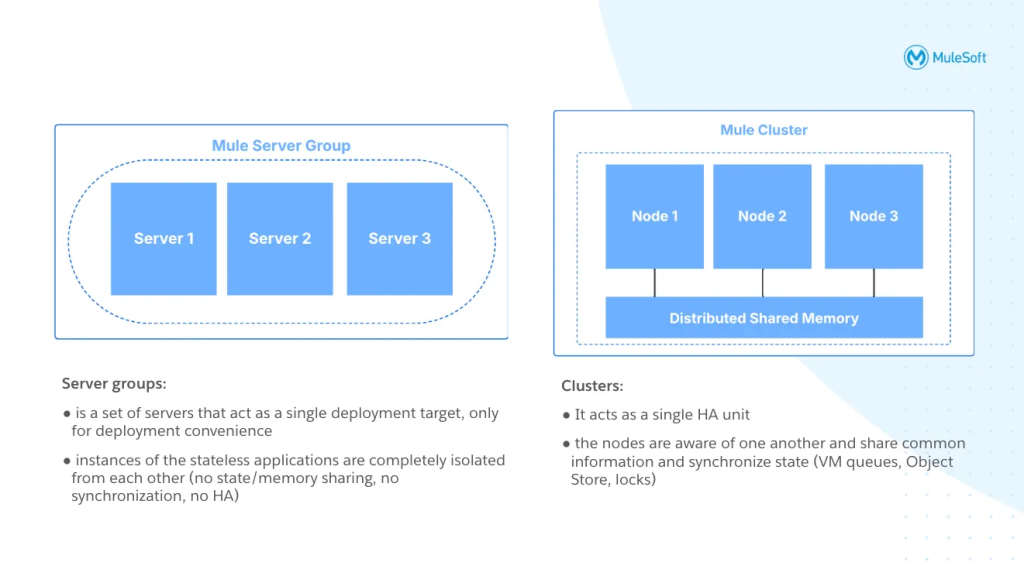
Figure 1: Server Groups and Clusters
Optimize your operations by no longer deploying Mule applications to individual MuleSoft Hybrid Standalone servers one by one.
Learn how Server Groups can treat a collection of servers as a single deployment target, bringing the much-needed redundancy and centralized management to your architecture; ensuring a faster application restoration and minimal downtime.
This guide breaks down everything you need to know about Server Groups and most importantly why they are so valuable for managing your applications and upgrading runtime versions seamlessly. First let’s review how they can help you.
What’s the value of MuleSoft Server Groups for Hybrid Stand Alone Servers?
A MuleSoft Server Group acts as a single deployment target that connects a collection of servers together. This means focusing on operational efficiency and deployment automation rather than deploying the exact same application to every single server manually. When you use Server Groups, your Mule application artifact is stored securely right in the Cloud Control Plane. Storing that artifact centrally lets you manage everything from one single point, eliminating the headache of manually coordinating across multiple servers. As a result, anytime you add, update, or delete an app within the group, those changes automatically push to all connected servers at the exact same time. The Mule Agent installed on each standalone server maintains a secure WebSocket connection to the Control Plane, which is what allows this synchronized push and ensures continuous configuration management.
Beside speeding up deployments these Server Groups will give your architecture redundancy to help you restore operations fast and avoid costly downtime. The applications inside a Server Groups run in complete isolation, which makes them very different from traditional clusters. Because the servers do not share information with each other, API policies like rate-limiting will only apply locally on each server instead of being distributed across the whole group. If your setup actually requires shared memory or you run into strict concurrency issues, you will want to look into Mule Clustering instead. But for most standalone hybrid setups, this isolated approach creates a highly resilient and incredibly easy way to manage your deployments. Before you can start unlocking all these benefits and building out your infrastructure, you must first make sure your servers meet a few strict setup requirements.
For more details please visit the MuleSoft Server Groups documentation, creating a Server Group is simple and then you just add the servers to it. Now the question is: how do your MuleSoft Applications behave when using Server Groups?
Working with Mule Applications in a Server Group
You still require an External Load Balancer (like F5, NGINX, or AWS ALB) in front of the Server Group to actually distribute the HTTP traffic for these redundant MuleApps. There are key advantages to using Server Groups, the easiest way to illustrate this is to understand what happens when you are working with Mule Applications (MuleApps) in a Server Group.
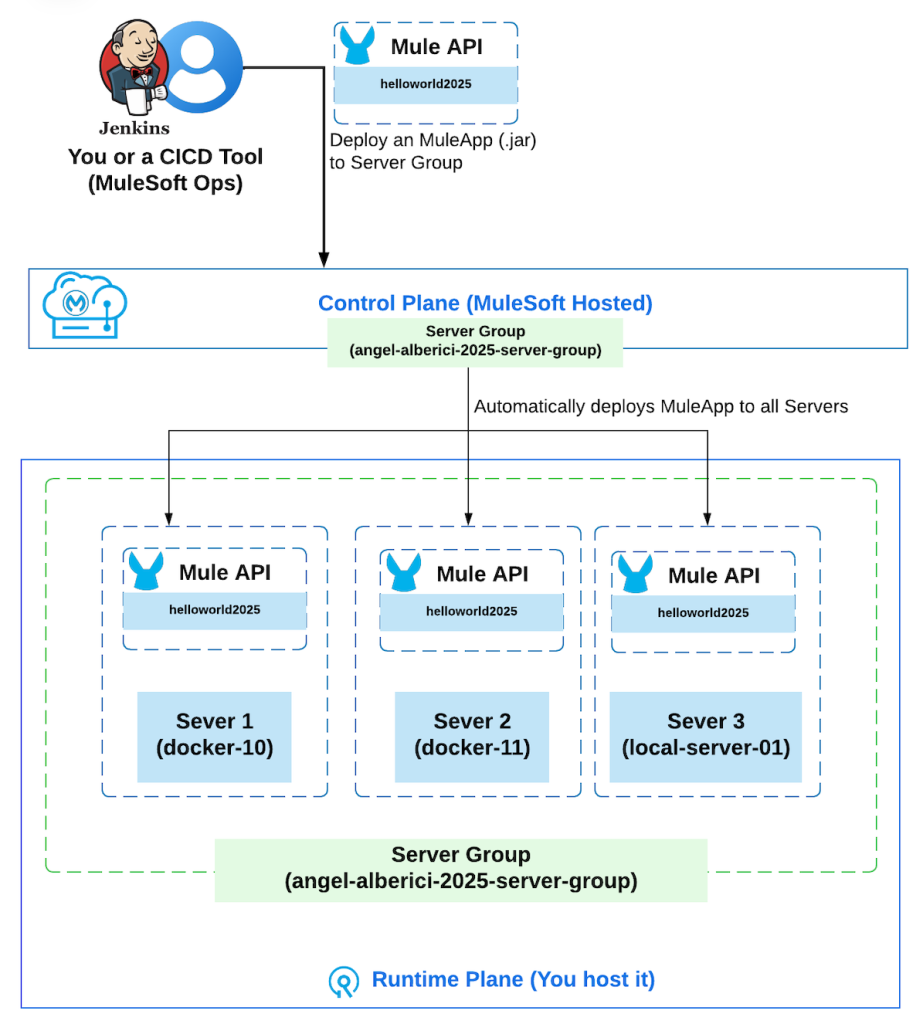
Figure 2: Deploying MuleApp to a Server Group
When all Servers in the Server Group are healthy (“Running” status)
- Deploying a MuleApp to a ServerGroup will deploy it to all Servers in the ServerGroup
- Updating a MuleApp (for example using a new .jar file) means the ServerGroup will update all the Servers in the ServerGroup with the new MuleApp version
- Deleting a MuleApp in a ServerGroup will delete the MuleApp in all Servers within the Server Group
When some Servers in the Server Group are in the “UNKNOWN” or “STOPPED” status
When a Server is in an Unknown/Stopped status, it will not be updated until the Server is started and it is connected back to the MuleSoft Control Plane. Once the Server connects back and is started correctly (status: Started) it will perform the pending actions (create the new MuleApp, update the existing MuleApp or delete the MuleApp). As an option you could modify the MuleApp in each server through the Operating System, before you even consider that let’s dive into why it is architecturally not recommended.
Always avoid manually managing the Mule Application in a Server that belongs to a Server Group
Modifying the applications directory (apps) in a Server which belongs to a ServerGroup is highly discouraged. This defeats the purpose of using a ServerGroup and causes dangerous inconsistencies. It will behave as follows:
- Directly adding a .jar to a MuleServer “apps” folder/directory: the Server will deploy that MuleApp only to itself and it becomes a “Rogue API”. This is dangerous, those changes are not visible in the Runtime Manager ServerGroup view and it will not be deployed to the other Servers in the ServerGroup, and the Control Plane becomes out of sync with your Runtime Plane Server
- Directly updating a MuleApp in a MuleServer by deleting the previous version and dropping a .jar. This carries the same dangerous disadvantages regarding configuration drift as mentioned previously
- Directly deleting a MuleApp folder including the Anchor file: It will delete the API locally. But, as you did not delete the Server Group MuleApp in the Control Plane, once you restart the server, all the MuleApps defined in the Server Group will be forcefully deployed again to match the Control Plane’s desired state.
We are almost there, three last fundamental behaviours around Mule Runtime, API Manager and Application storage more before you are ready to go.
Keep in mind the behavior from the Mule Runtime Version, API Manager and Application storage
Upgrade the Mule Runtime Version in a Runtime Manager Server Group
The Server Group will not automatically update the Mule Runtime Version for the Servers in the Server Group. As standard Hybrid Stand Alone Servers, patching is done individually by following the step by step MuleSoft official documentation, which allows for zero-downtime patching if routed correctly through your load balancer.
API Manager and Server Groups
When making Gateway deployments on a Server Group each Server in the group will behave independently of the others. There is no information sharing and this is different from MuleClusters.
In other words: each Policy is applied individually to each Server in a ServerGroup, example being rate-limiting or throttling both defined using the ServerGroup but each limit applies per Server. This means the rate-limiting policies will turn to local-only, even if they have been configured to be distributed.
MuleApplication is stored in the Control Plane (Cloud)
It is important to consider that when using ServerGroups the Artifact (.jar) of the Mule Application is being stored in the Control Plane. This is what allows the Control Plane to manage Mule HSA Servers as “one unit” in the ServerGroup when working with MuleApps, instead of manually coordinating and aligning deployments for each individual Servers.
Conclusion
In Hybrid Standalone you can work with individual Servers, with Clusters and with Server Groups. The MuleSoft Server Groups provide a critical architectural advantage for Hybrid Standalone environments by shifting deployment orchestration from the individual node to the Anypoint Control Plane. Creating a Server Group is a very simple, it is important you understand the Architecture implications.
While they require careful consideration regarding external load balancing and state isolation compared to traditional clusters, adopting Server Groups drastically reduces administrative overhead, prevents dangerous configuration drift, and establishes a highly available, automated foundation for your API-led infrastructure.