
Salesforce Headless 360 makes over 60 MCP and CLI tools available that let external agents directly access your Salesforce data, trigger flows, and query business intelligence. As you adopt this paradigm shift into your architecture, the key question is: What governance sits between the external agent and Headless 360 once that data crosses the Salesforce trust boundary?
We’re excited to announce that MuleSoft Agent Registry now includes the following Salesforce-hosted MCP servers:
- SObject All: Full CRUD operations (create, read, update, delete), query, and search across all Salesforce objects. Respects field-level security and sharing rules
- SObject Reads: Read and query only, with no mutation capabilities. Safe access for reporting and analytics
- Data 360: Query unified customer data across your entire organization. Consolidates data from multiple platforms for a complete customer view
- Tableau Next: Discover semantic models, query KPIs, and execute analytics. Surfaces business intelligence to agents
All four servers enforce per-user authentication and respect Salesforce’s security model: field-level security, object permissions, and sharing rules for every operation.
Why does this matter?
The governance gap. Before Headless 360, agents that accessed Salesforce ran inside Salesforce and benefited from its comprehensive security model including profiles, permission sets, field-level security, sharing rules, audit trails. All within one trust boundary.
Headless 360 changes the topology. An agent built on Amazon Bedrock, Microsoft Copilot, or your own infrastructure can now call a Salesforce MCP server to retrieve account data. That same agent might then call Snowflake, your mainframe, or Zendesk – all in one workflow. Data that belonged to a single trust boundary now transits across multiple applications.
Salesforce’s security model works perfectly inside Salesforce. Once account records or contact lists leave Salesforce and enter a Bedrock runtime or Copilot instance, Salesforce has no visibility into what happens next. This spans several concrete governance problems.

Build a policy once, apply it anywhere
Agent Fabric, a control plane for multi-vendor agent estates, addresses these with a simple topology: Omni Gateway enforces governance inline at the MCP boundary (PII detection, access control, prompt decoration, audit logging), and handles cost and performance (token budgeting, routing, rate limiting), Trusted Agent Identity propagates user context across hops, Agent Broker orchestrates multi-system workflows, and Agent Visualizer traces them end-to-end.
None of this requires Salesforce to change. Salesforce provides the MCP endpoints. You provide the governance layer between those endpoints and your agent estate. Let’s go over how each tackles the governance gaps.
1. Cost attribution and spend control
When multiple agents across multiple business units independently call Salesforce MCP endpoints, org-level LLM consumption becomes a single aggregated number with no visibility into which agent, BU, or use case drove spend. MuleSoft Omni Gateway solves this at the LLM proxy layer: token budgeting per agent or business unit, rate limiting to prevent runaway consumption, and per-entity cost attribution so FinOps can answer: “Which agent in which BU ran up the bill?”
2. PII protection on data egress
When Salesforce returns a customer contact record through an MCP call, Salesforce has verified the caller had permission to read it. But Salesforce’s permission system did not evaluate whether that data should exit the Salesforce trust boundary into a third-party agent platform. A Bedrock agent queries accounts through Salesforce SObject Reads and receives email, phone, contract terms, support history. That data now lives in Bedrock, a system Salesforce doesn’t control. Is PII protected there? Logged? Used for training? Encrypted?
Salesforce can’t enforce these controls. Only an inline governance layer between the agent and Salesforce can. Omni Gateway’s PII Detector runs bidirectionally on MCP traffic: detects sensitive data patterns (SSN, credit card, email, phone, health identifiers) in responses from Salesforce, blocks or redacts data before it leaves the trust boundary, and logs detection events for audit compliance.
3. End-to-end identity propagation
When an external agent calls Salesforce through an MCP server, the call arrives with the agent’s service principal identity, not the end user’s. This breaks user-level attribution. If the agent retrieves sensitive data or modifies an opportunity, the Salesforce audit trail shows a generic service account made the call – not the customer success rep who initiated it. In regulated environments (healthcare, financial services, government), auditors require tracing every data access to the user who initiated it.
MuleSoft’s Trusted Agent Identity propagates the original user’s identity across the full chain using OAuth2 and OpenID Connect: the end user authenticates to the agent platform, it wraps that identity in a short-lived, cryptographically signed token, the token flows through the agent call to the MCP server, Salesforce receives the actual user’s identity and applies permission checks based on that user’s profile and sharing rules, and the audit trail correctly attributes data access to that user.
4. Cross-vendor orchestration and unified observability
Real workflows don’t stop at one system. A typical Headless 360 workflow chains Salesforce Data 360, Snowflake, Zendesk, and back to Salesforce. Salesforce can observe Salesforce. Bedrock can observe Bedrock. Snowflake can observe Snowflake. But no single system sees the complete flow.
Agent Visualizer produces a unified, correlated trace across all platforms: distributed tracing that follows a single agent execution from initiation through completion, visibility into every hop (agent call, MCP invocation, dependent service, response synthesis), latency breakdowns per system, error propagation across the full chain, and correlation IDs that tie logs from Bedrock, Salesforce, Snowflake, and Zendesk into one narrative. This is structurally different from asking each vendor for logs; you get five separate views with no connection. Agent Visualizer produces one view.
5. Selective access control for MCP tools
Not every agent should have access to all 60+ MCP tools. A marketing automation agent might safely use SObject Reads and Tableau Next. It should never have access to SObject All. An internal customer success agent might need full CRUD on opportunities; a vendor partner agent should not.
Omni Gateway’s attribute-based access control (ABAC) via Cedar policy expressions lets you scope MCP tool access: define policies in code (“agents in the customer-success domain can call SObject All; agents in the partner domain can call SObject Reads”), reference agent domain, role, business unit, or custom metadata, enforce policies inline before requests reach Salesforce, and keep policies version-controlled and auditable. This is the agent-era equivalent of API gateway policies – a conversation enterprise architects already know how to have.
6. Prompt safety and response validation
An agent might be designed not to ask for salary data, but nothing prevents a user from asking it to. Salesforce’s schema validation ensures requests are well-formed, but it doesn’t enforce business policies specific to your organization.
Omni Gateway’s Prompt Decorator injects organization-specific guardrails into prompts before they hit Salesforce MCPs: guardrail libraries inject standard instructions (“Do not retrieve employee salary data,” “Do not modify historical records,” “Always flag high-value opportunities for review”), policies update without redeploying agents, and bidirectional decoration covers prompts going to Salesforce and responses coming back.
7. Unified audit trail
A regulated customer’s auditor asks: “Show me every time customer X’s data was accessed by an AI agent in the last 90 days, regardless of platform.” Salesforce’s audit logs cover Salesforce. Bedrock’s logs cover Bedrock. Copilot’s logs cover Copilot. But customer X’s data access spans all three platforms. Assembling a single timeline requires correlating events across three separate systems with different schemas, retention policies, and access controls.
Omni Gateway’s audit and content logging sits inline on every agent-to-Salesforce MCP hop: logs every MCP invocation (who, which tool, what parameters, what data), correlates logs across platforms using trace IDs that flow through the entire request path, integrates with Anypoint Monitoring for a unified dashboard, and supports regulatory requirements (PCI-DSS, HIPAA, SOC 2, custom compliance). This is impossible to assemble after the fact from vendor logs. An inline gateway produces it in real time.
How Headless 360 with Agent Fabric works
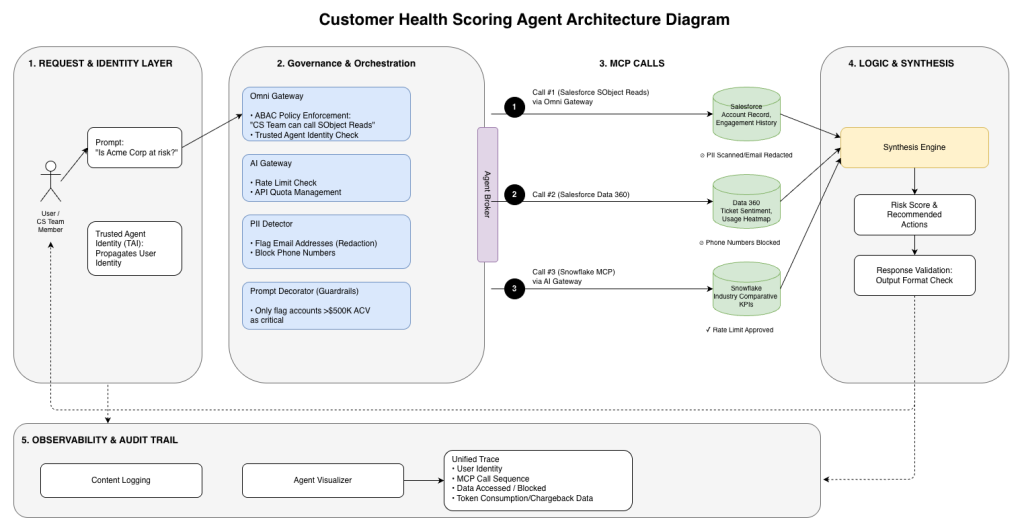
Consider an agent that scores customer health by combining data from multiple sources:
Agent request: A customer success team member asks the agent: “Is Acme Corp at risk?”
| MCP Call 1 (Salesforce SObject Reads): Agent calls through Omni Gateway | Trusted Agent Identity propagates the CS rep’s identity |
| Omni Gateway applies ABAC policy: “CS team can call SObject Reads” and Salesforce returns account record, engagement history | |
| PII Detector scans response, flags email address for redaction | |
| MCP Call 2 (Salesforce Data 360): Agent calls for behavioral signals | Same TAI and ABAC checks |
| Data 360 returns support ticket sentiment and product usage heatmap | |
| PII Detector blocks customer phone numbers from returning | |
| MCP Call 3 (Snowflake): Agent queries for cohort benchmarks | AI Gateway applies rate limit check; request approved |
| Snowflake returns industry comparative KPIs |
Synthesis: Agent synthesizes signals into risk score and recommended actions.
- Prompt Decorator has already injected guardrails: “Only flag accounts >$500K ACV as critical”
- Response validation checks output format
Audit Trail: Agent Visualizer and Content Logging produce a unified trace:
- Which user initiated the request
- Which MCPs were called in sequence
- What data was accessed
- What data was blocked or redacted
- Total API calls and token consumption for chargeback
This flow is impossible without an external governance layer. Salesforce alone cannot redact PII in data headed to Snowflake. You need a system to attribute costs across Bedrock, Snowflake, and Salesforce. Only an inline gateway spanning all systems can.
Next steps
What this means for your teams:
- Platform teams shift multi-agent governance from custom integration code to policy-as-code
- Security teams get a single enforcement point for data protection, access control, and audit policy across all agent-to-Salesforce traffic, regardless of which external platform hosts the agent
- FinOps teams see cost attribution and rate limiting move from unsolved problem to solved problem
- Compliance teams satisfy regulatory requirements (SOC 2, HIPAA, PCI-DSS) with unified audit trails, PII protection, and identity propagation controls that individual vendors cannot address alone
To learn more, check out the following resources:


