
As organizations scale AI agent deployments, a token cost problem builds with every new server you connect. Every MCP server your agents use sends its full tool catalog: schemas, descriptions, parameters, etc.— with every single LLM request. A SaaS MCP server with 30+ tools can add 150K–300K definition tokens to every call, whether or not the agent invokes a single one of those tools.
Across an enterprise running dozens of MCP servers, that overhead compounds. Aggregate LLM billing shows you the total spend. It doesn’t show you which server, which agent, or which tool definition is responsible for it. Most teams find out they have a problem when the invoice arrives.
Today we’re announcing Cost Management in the Enhanced Experience, a new capability under governance and part of MuleSoft’s Agent Control Plane, which gives platform teams a centralized layer to govern, secure, and manage AI agents operating across the enterprise. Cost management extends that governance to token consumption: full visibility into what your MCP servers are spending, and the ability to reduce it without modifying a single server.
Token costs add up faster than you’d expect
LLM providers charge by the token, roughly four characters of text, about three-quarters of a word. Every agent call counts the tokens going in (your instructions, context, and tool definitions) and the tokens coming out (the model’s response), then bills at a per-token rate.
The part that catches teams off guard is that the model charges for everything in its context window, not just the parts it uses. The context window is the model’s working memory, i.e. everything it can see at the moment it reasons. When your agent connects to an MCP server, that server loads its complete tool catalog into the context window before the agent does anything.
Think of it as handing someone a 200-page reference manual before every question. You pay for the delivery whether they open it or not. This is where the 150K–300K token overhead comes from. On a server with 30+ tools, the vast majority of those tokens are definitions for tools the agent never calls in that session – in every request, at full cost.
The problem compounds when you don’t own the servers
Agent-to-agent interactions make this worse. A single user query fans out across multiple MCP servers, each loading its full tool catalog into the same context window — and the cost multiplies with it. This is especially acute for organizations building headless, API-first architectures, where the composability that makes the architecture powerful also means more discrete services, more MCP servers, and more tool catalogs loading in parallel on every agent request.
Most of these servers aren’t yours to fix. Snowflake, GitHub, Atlassian, Notion — you consume them, you don’t control them. The standard advice — trim tool descriptions, implement lazy loading — assumes you have access to the server code. You don’t. You can’t ask each vendor to independently solve a cost problem that’s landing on your invoice today. Without a governance layer between your agents and these servers, the only levers available are cutting agent usage or accepting the overhead as a fixed cost of running AI at scale. Neither is a real answer.
See where your token budget is actually going
Before you can reduce costs, you need attribution. The Cost Management dashboard answers the questions that aggregate billing never could: which servers are expensive per interaction, not just in total? Which time periods correlate with a specific agent deployment or traffic event? Which servers have addressable overhead versus unavoidable baseline cost? Navigate to Governance > Cost Management to see total consumption, call volume, tokens-per-call, and time-range trends (1H, 24H, 7D, 30D) across all MCP servers in your organization.
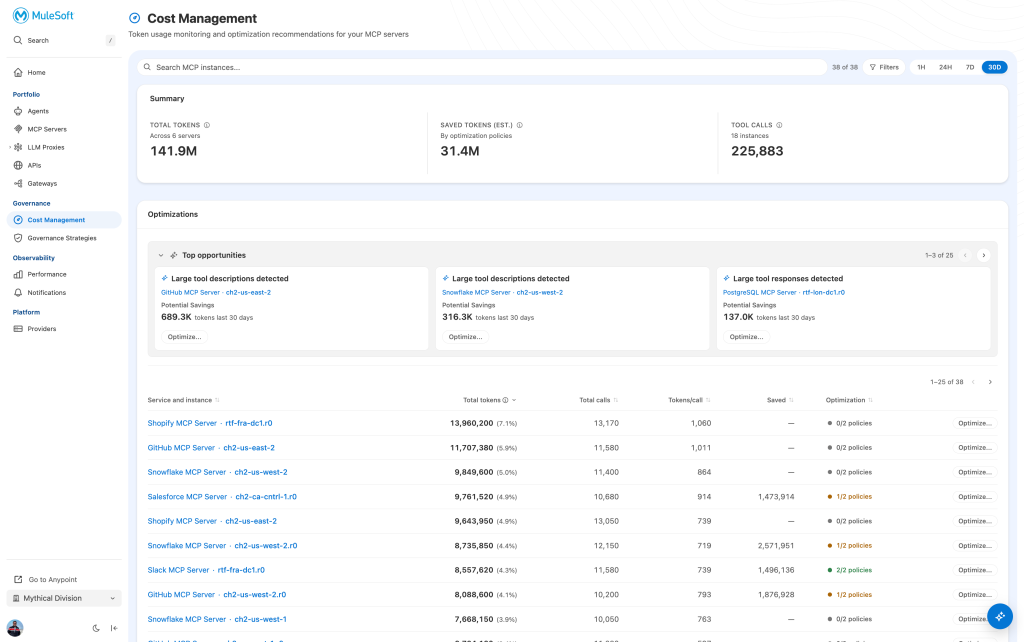
The per-server breakdown surfaces what the monthly invoice hides: a single SaaS MCP server responsible for 11.7M tokens (5.9% of org total), another server with 909.6K tokens of addressable savings sitting unoptimized. That’s the prioritization signal your team needs to act rather than guess.
Reduce spend on servers you don’t control
The Omni Gateway sits inline between your agents and every MCP server they connect to.
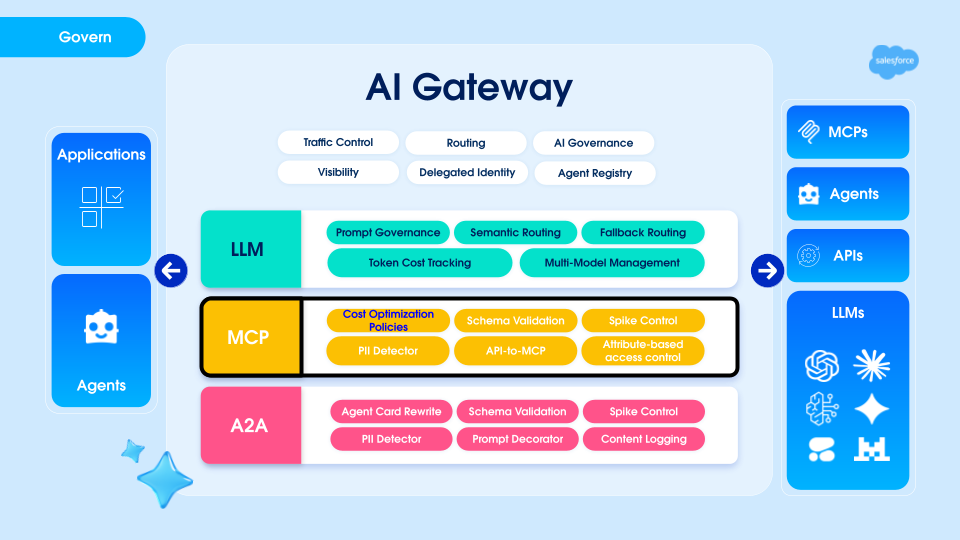
This position in the call path is what makes optimization possible without server access. Policies live at the gateway layer you control. The MCP server stays untouched. Your agent code stays untouched. Once attribution shows you where to focus, the dashboard surfaces Top Opportunities — servers where traffic analysis shows meaningful reduction is achievable:
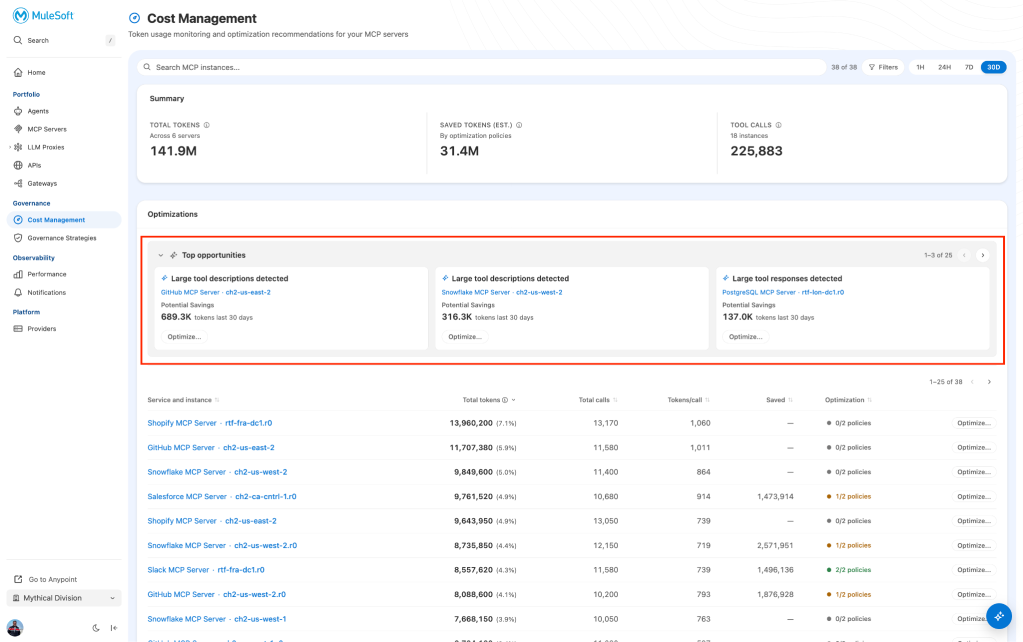
- Verbose tool descriptions: Schema bloat inflating every request regardless of which tools the agent calls (e.g. Notion MCP: 316.3K potential token savings over 30 days)
- Oversized tool responses: Payloads larger than the agent typically needs (e.g. 207.5K potential savings on response tokens)
Click Optimize on any opportunity to enter the policy workflow for that server.
Apply policies that match each server’s risk level
The system analyzes actual traffic patterns for each server instance and recommends specific policies based on what’s driving the cost. Two policies are available today:
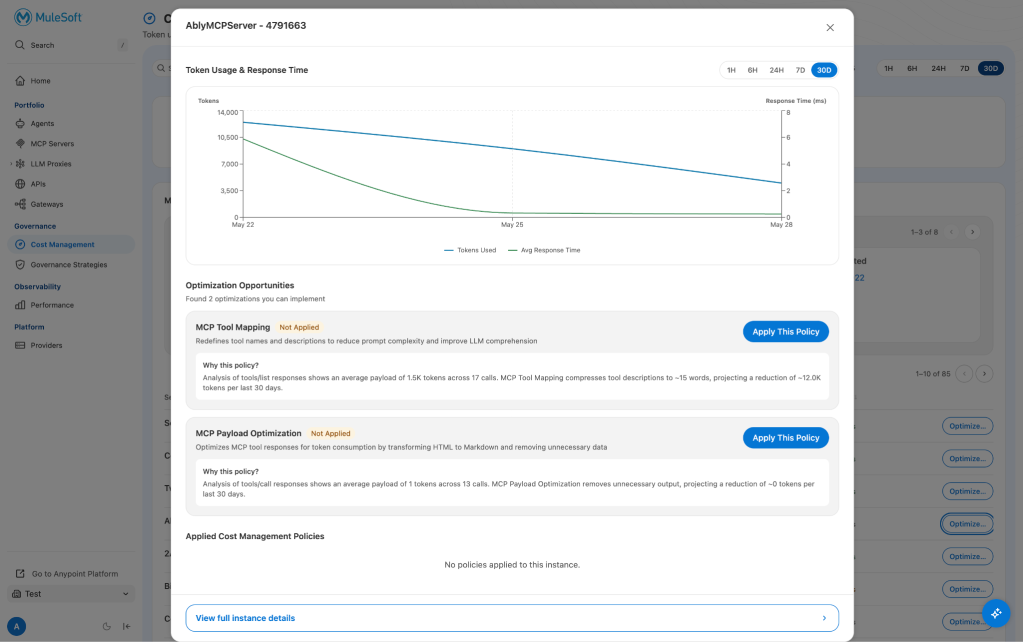
Tool Mapping compresses MCP tool descriptions using an LLM, reducing the token footprint of each definition while preserving the semantic meaning agents use to discover and select tools. In one tested configuration — a SaaS MCP server with 38 tools — descriptions went from 4,280 to 1,190 tokens, a 72% reduction, with no change to the server.
Across tested scenarios, Tool Mapping produces 30–75% reduction depending on how verbose the original schemas are. LLM compression is probabilistic. Compressed descriptions maintained agent tool-discovery accuracy at [X]% in our testing. For servers on critical agent paths, enable Tool Mapping in shadow mode for 24–48 hours before applying to live traffic — a small investment to validate behavior before you commit.
Payload Optimization works on the other side of the call by reducing tool response size before it reaches the agent’s context window. HTML converts to Markdown, metadata the agent doesn’t act on gets stripped, and the data the agent needs arrives intact. In tested scenarios, this produces approximately 30% reduction on response token costs.
As with Tool Mapping, running in shadow mode first is worth the extra day if the server is on a path your agents depend on heavily. The two policies compose. On a server with both verbose schemas and large responses, applying both produces compounding savings rather than additive ones. The decision isn’t whether to optimize — the dashboard already answered that. The decision is which policy to start with and how much caution the server warrants given its role in your agent workflows.

Make changes confidently across shared resources
A policy applied at the gateway affects every agent using that MCP server instance — which is the point, but also means knowing what you’re touching before you touch it. The dependency view in Global Flow Resources shows every flow referencing a given server, with direct links into each one so you can review downstream impact before applying changes. The system also blocks deletion of any resource currently in use. No policy change silently breaks a live agent.
Getting started
Cost Management is one part of a larger answer to a problem that isn’t going away: as agent deployments scale across headless architectures and multi-vendor MCP ecosystems, the cost, security, and compliance risks of unmanaged servers compound together. Visibility and token governance are the cost dimension of that problem. Omni Gateway is designed to address the rest. To learn more, read the documentation on MuleSoft Omni Gateway and Enhanced Experience. For a walkthrough of the full workflow, see the interactive product tour.


