
For Salesforce admins and integration developers, keeping data aligned across systems often turns into a manual translation exercise. For example, a Salesforce case status P1 may need to map to a Jira ticket status Critical. Traditionally, this logic is handled through hardcoded if/else formulas scattered across flows and integrations.
Over time, this creates formula debt, complex, duplicated logic that becomes difficult to manage and scale. Common challenges include:
- Wasted time: Mapping logic must be recreated for every new integration or workflow
- High maintenance: A simple picklist update can require changes across dozens of flows
- Operational risk: Hardcoded logic increases the chance of errors and makes it harder to handle unexpected values consistently
Value Maps solve this problem by introducing centralized, reusable lookup tables for data translation. Instead of embedding mapping logic directly into flows, teams can define mappings once and reuse them across the entire Salesforce org. This creates a single source of truth (SSoT) for translating values between systems.
The result is simpler integrations, easier maintenance, faster updates, and a reduced risk of mapping inconsistencies. As systems and business processes evolve, Value Maps help ensure data stays consistently aligned without the overhead of maintaining fragile formulas across every workflow and integration.
Key benefits of Value Maps
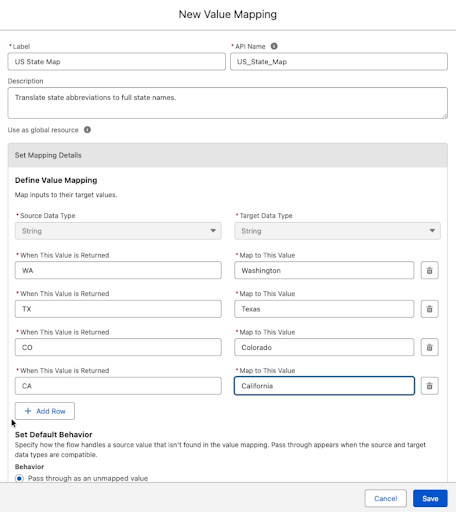
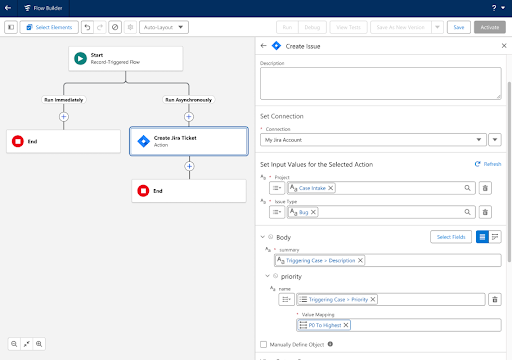
Create at the Point of Need: The user can create Value Maps directly during field mapping. This inline experience ensures the work stays within the Flow Builder without interruption.
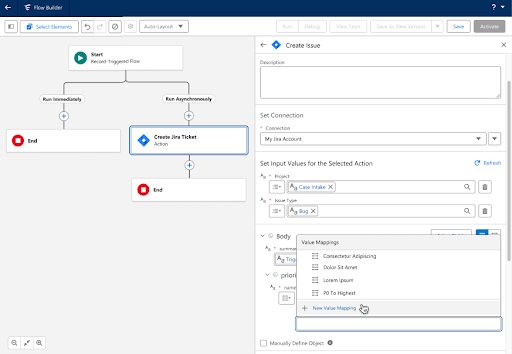
Build Once, Use Everywhere: Once created, maps are saved as reusable assets accessible across all flows in a user’s org.
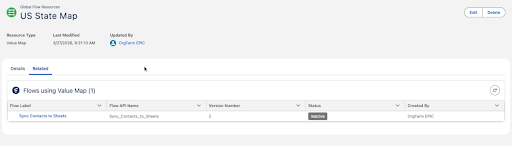
Centralized management: A dedicated ‘Global Flow Resources’ page allows the user to manage all maps, view dependencies, and see exactly which flows are using them
How do Value Maps work?
Value Maps act as a decoupled translation layer. Instead of embedding complex transformation logic inside every individual flow, the flow calls a centralized map to translate system dialects. For example :
- Source System Salesforce sends a Case status value as ‘P1′.
- Value Map (The Middleware Layer) performing a lookup on ‘P1’ and finds target system value as ‘Critical’
- Target System (e.g. Jira) receives the translated value (‘Critical’)
Real-world examples
| Use case | Source system value | Target system value |
|---|---|---|
| Lead syncing | Numeric Scale {‘1’, ‘2’, ‘3’} | {‘Agency’, ‘Partners’, ‘Channels’} |
| Opportunity stages | {‘1’, ‘2’, ‘3’…} | {‘Qualification’, ‘Analysis’, ‘Closed Won’…} |
| Support rickets | {‘P1’, ‘P2’, ‘P3’} | {‘High’, ‘Medium’, ‘Low’} |
Intelligent error handling
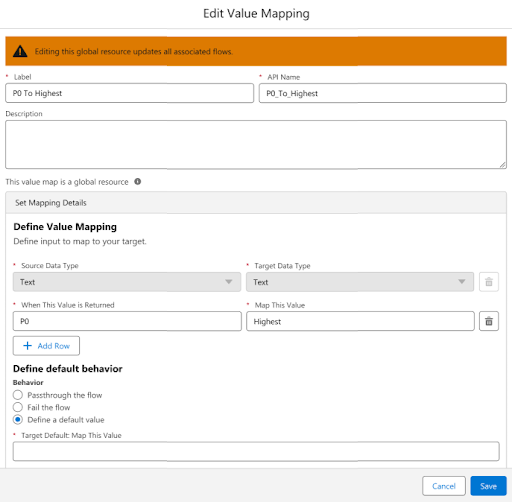
What happens if a flow receives a value that isn’t in the map? We’ve introduced three configurable system constraint modes that provide full control over data integrity:
- Flow errors out: Ideal for critical data where a missing value requires immediate attention
- Passthrough: The system passes the original source value as is to the target system
- Use default value: The user can assign a catchall value to keep the integration running smoothly
Dependency view
To prevent accidental disruptions, we’ve introduced a new related dependency view in the ‘Global Flow Resources’ page that provides a visual safeguard.
- Safety First: The system blocks the deletion of any Value Map currently referenced by a flow.
- Traceability: The user can view a structured list of all related flows and click directly into them to manage dependencies.
3 steps for implementing Value Maps
Here are the three steps you need to implement Value Maps:
- Create the Global Resource
- Map inline within Flow Builder
- Configure intelligent error handling
Let’s go through each one in more detail.
1. Create the Global Resource
Navigate to the ‘Flow Builder’ or ‘Global Flow Resources’ page. Click new ‘Value Mapping’ and define the keys (Source) and values (Target). For example, map your Salesforce state codes (e.g. “US”) to your target system values (e.g. “United States”).
2. Map inline within Flow Builder
Open your integration in Flow Builder. When mapping fields, select your new Value Map as the resource. This one-time selection replaces what would traditionally be a complex, multi-line nested formula.
3. Configure intelligent error handling
Choose a ‘System Constraint Mode’ to handle unexpected data. Select ‘Fail the flow’ for mission-critical data that requires immediate attention, or ‘Use Default Value’ (e.g. “Other”) to ensure the integration continues to run smoothly.
Now, check out the full demo:

Value Maps are designed for metadata-style lookups (like status codes or country names) and the limit is 500 entries per map. This feature is available to all MuleSoft for Flow: Integration customers without any additional charge.
Ready to build?
Value Maps in MuleSoft for Flow: Integration turn complex workarounds into a streamlined, scalable process. By replacing manual formulas with reusable lookup tables, flows stay cleaner and integrations go live faster. Try Value Maps in your Salesforce org today to simplify your complex field mappings.


