All customers can now see their vCore usage broken down by application directly in the Anypoint Usage Report. The report refreshes every 12 hours, so shortly after each deployment you can see the vCore min and vCore peak for every application. We also calculate your maximum vCore usage across production and preproduction for you, by day and by month.
Turn usage into accountability
With per application visibility, you can finally connect consumption to the teams behind it. That makes it straightforward to run internal chargebacks to the specific departments or business units driving usage, so cost conversations are grounded in real numbers instead of estimates.
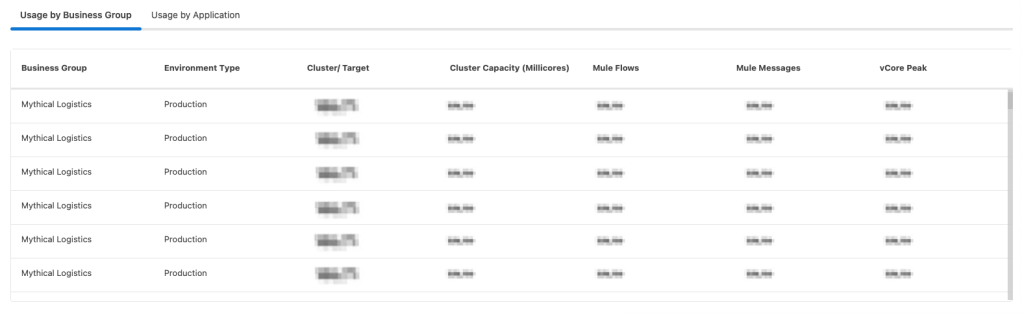
Usage isn’t only broken out by applications. The report also rolls consumption up by business group, reported with vCore peak, so platform owners get both the fine grained and the organizational view in one place.
How usage is measured
vCore usage is sampled every hour, and the peak hourly value rolls up into your daily and monthly maximums:
- Hourly: Peak vCore consumption captured each hour
- Daily: Highest hourly peak within the day
- Monthly: Highest hourly peak within the month
At the top of the report, a metric card gives you the headline number: Maximum vCore usage is the highest peak vCore consumption across all CloudHub and CloudHub 2.0 applications in your organization, shown with the date and time (UTC) of that peak. Open the Usage by Application tab to see per application vCore details. The table lists all CloudHub (CH1), CloudHub 2.0 (CH2), and Runtime Fabric (RTF) applications alongside their consumption:
| Column | Description |
|---|---|
| Deployment type | The deployment platform for the application: CH1 (CloudHub), CH2 (CloudHub 2.0), or RTF (Runtime Fabric) |
| HPA status | Whether Horizontal Pod Autoscaling (HPA) is enabled for the application. Displays Enabled or N/A |
| vCore peak | The highest hourly vCore consumption for the application within the selected time period |
| vCore min | The guaranteed base vCore allocation based on the minimum replica configuration |
Note: vCore Min can be higher than vCore Peak; this is expected.

Ready to get started?
Head to the Anypoint Usage Report to see your vCore usage by application today.