Turn Web content Into Agent Intelligence
Web content has become a critical enterprise data source but for most organizations, it remains disconnected from their systems.
Product catalogs live on websites. Documentation is spread across knowledge portals. Reviews, market intelligence, partner information, and public records are constantly changing online. Yet teams still rely on manual exports, custom scripts, or one-off scraping solutions to bring this data into their workflows.
The Web Crawler Connector changes that.
Instead of treating websites as something humans browse, it treats them as a data source that MuleSoft can integrate with. In this post, we’ll walk through the connector architecture, supported crawling strategies, deployment considerations, and several real-world use cases.
Why do you need a Web Crawler?
Most integration platforms focus on APIs, databases, files, and messaging systems. However, many important enterprise data sources are still exposed through websites:
- Product documentation
- Support knowledge bases
- Regulatory portals
- Partner websites
- Public datasets
- Research portals
Developers often end up creating separate crawling infrastructure to collect this information before integrating it into business workflows. The Web Crawler Connector brings web content acquisition directly into the MuleSoft ecosystem.
Who should use it?
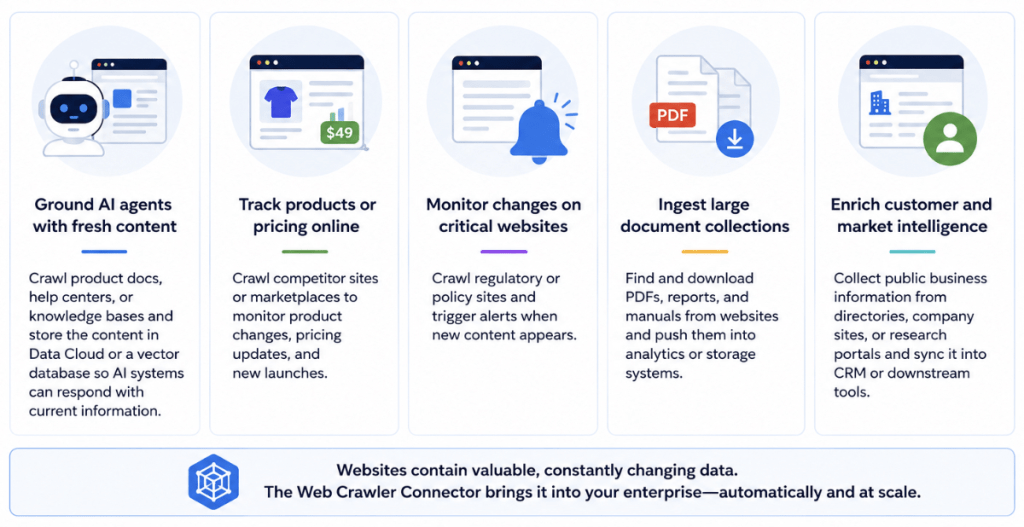
Use the Web Crawler Connector when the job is to bring web content into a repeatable enterprise workflow, such as
- Ground AI agents with fresh content
Crawl product docs, help centers, or knowledge bases and store the content in Data Cloud or a vector database so AI systems can respond with current information. - Track products or pricing online
Crawl competitor sites or marketplaces to monitor product changes, pricing updates, and new launches. - Monitor changes on critical websites
Crawl regulatory or policy sites and trigger alerts when new content appears. - Ingest large document collections
Find and download PDFs, reports, and manuals from websites and push them into analytics or storage systems. - Enrich customer and market intelligence
Collect public business information from directories, company sites, or research portals and sync it into CRM or downstream tools.

Architectural Overview of MuleSoft Web Crawler
At a high level, the connector discovers pages, fetches content, extracts metadata, and emits Mule events.
Seed URL
    ↓

Web Crawler Connector
    ↓

URL Discovery
    ↓

Content Extraction
    ↓

Mule Events
    ↓

Any Downstream System
• Salesforce
• Snowflake
• Amazon S3
The crawled page becomes a Mule event, which means it can be routed, transformed, filtered, stored, or enriched using standard MuleSoft integration patterns.
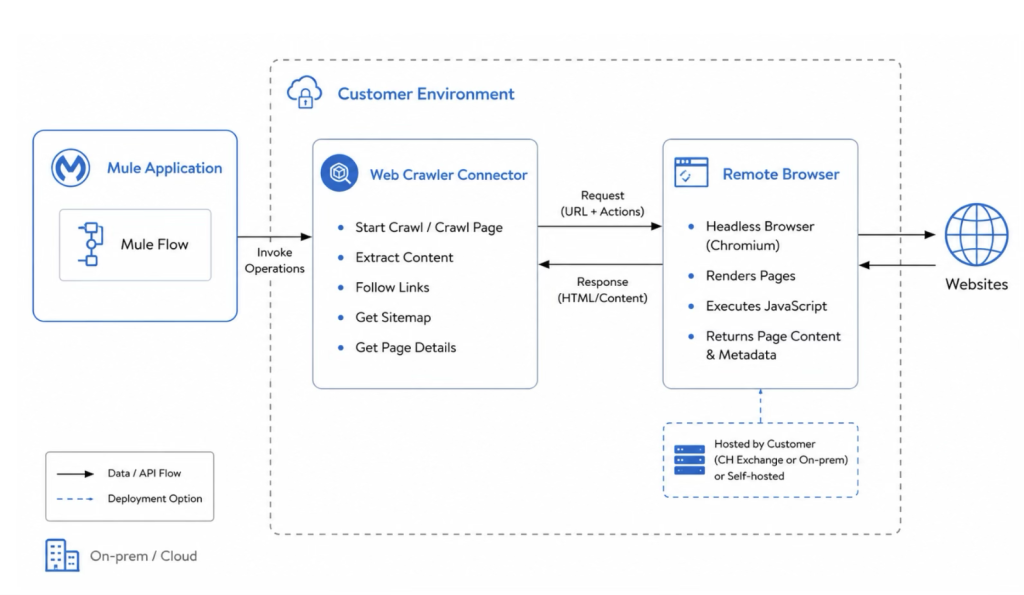
The connector supports two common crawling patterns:
- HTTP crawling for websites where content is available directly in the page response.
- Remote browser crawling for JavaScript-heavy sites where pages must be rendered before extraction.
That gives teams flexibility without forcing them to rebuild crawler infrastructure from scratch.
Built for integration, not just extraction
The real value of the Web Crawler Connector is not just that it can fetch pages. It is that it turns web content into something MuleSoft can work with natively.
That means teams can:
- connect crawled data to enterprise systems
- reuse existing integration logic
- automate ingestion workflows
- support AI, analytics, and operational use cases from one platform
Whether you’re powering AI agents, enriching customer data, monitoring competitors, or automating document ingestion, the connector enables you to bring web data directly into your existing MuleSoft workflows – securely, reliably, and at scale. Because the web shouldn’t be outside your integration strategy.