
Introduction
Enterprises carry decades of knowledge inside documentation portals, technical PDFs, and knowledge base articles. Getting an AI agent to understand all of it — accurately, in real time, without hallucinating — requires more than a capable LLM. It requires a deliberate data pipeline.
This post walks through a production-grade Retrieval-Augmented Generation (RAG) architecture built on MuleSoft Anypoint Platform and Salesforce Data Cloud that transforms static enterprise documentation into a dynamic, AI-powered knowledge layer for Agentforce.
The Challenge: Tribal Knowledge at Scale
Imagine an enterprise that has grown its product portfolio over more than a decade. Every product launch, every firmware update, every troubleshooting resolution — all of it captured across thousands of documentation pages in a mix of formats and locations. For a human support agent, navigating that landscape is difficult. For an AI agent, it is impossible without structured ingestion.
Enterprise documentation typically exists across:
- Product documentation websites (HTML pages across multiple URL hierarchies)
- Technical PDFs — user manuals, installation guides, troubleshooting references
- Knowledge base articles with version-specific content
- Release notes that update frequently
An AI agent that depends solely on LLM training data will quickly become stale, generate inconsistent answers, and — critically — hallucinate details that are wrong. Retrieval-Augmented Generation solves this by grounding every agent response in documentation that is current, searchable, and enterprise-specific.
What is RAG? Retrieval-Augmented Generation combines a retrieval step — finding relevant information from a knowledge base — with a generation step — using an LLM to synthesize a natural language response. The retrieval step ensures the model answers from facts, not from statistical inference alone.
Architecture Overview
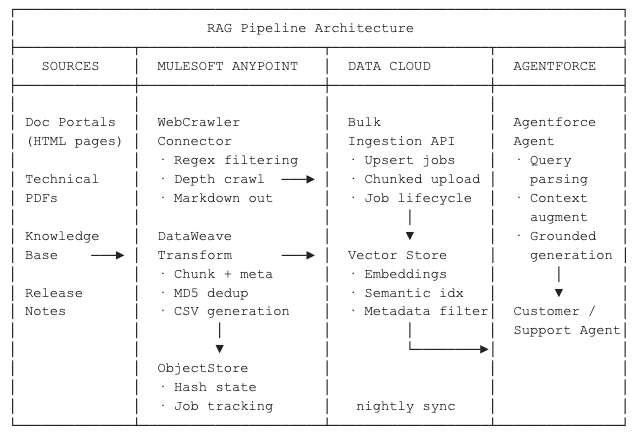
The full pipeline connects MuleSoft Anypoint Platform, Salesforce Data Cloud, and Salesforce Agentforce across four functional layers: ingestion, transformation, storage, and retrieval.
Part 1: Intelligent Document Ingestion
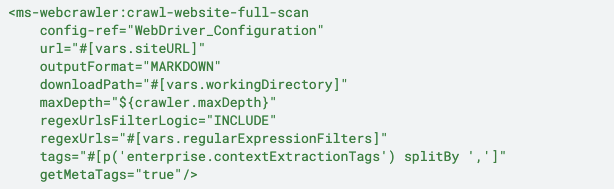
Web Crawling with the MuleSoft WebCrawler Connector
The first stage crawls product documentation portals systematically. The MuleSoft WebCrawler Connector provides depth-controlled crawling, regex-based URL filtering, and HTML metadata extraction — producing clean Markdown output that downstream stages can reliably parse.
Key capabilities:
- Regex-based URL filtering to focus on relevant content
- Depth-controlled crawling to avoid infinite loops
- Metadata extraction from HTML meta tags
- Markdown output for clean, structured content
PDF Document Processing
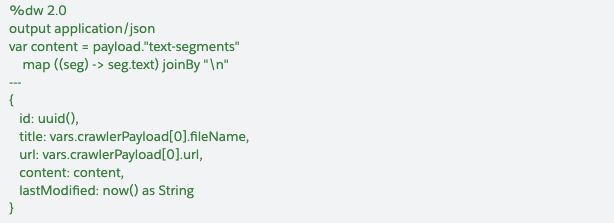
Technical documentation often lives in PDF format alongside web content. The MuleSoft Vectors Connector handles PDF ingestion: downloading files from specified URLs, extracting text segments, and merging content into structured JSON with preserved metadata including filename, source URL, and timestamp.

The extracted content is then transformed into a consistent structure:
Incremental Sync via MD5 Hashing
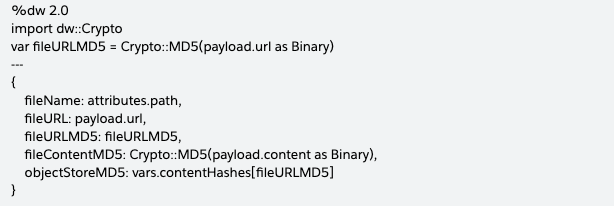
To avoid re-processing unchanged content on subsequent sync runs, the pipeline generates an MD5 hash of each document’s URL and content, stores these hashes in MuleSoft ObjectStore, and compares them on each execution. Only documents whose hash has changed are re-ingested — reducing both processing time and Data Cloud API calls significantly after the first full run.
Part 2: Data Transformation for Data Cloud
Salesforce Data Cloud ingests data via bulk CSV upload. The transformation layer converts crawled content into structured CSV files enriched with metadata that makes semantic retrieval more accurate.
Metadata Schema
| Field | Description |
| Id | Unique document identifier (UUID) |
| Title | Page or document title extracted from HTML or filename |
| URL | Canonical source URL |
| Content | Full extracted text content |
| WebDoc_version | Version identifier from meta tags |
| source | Content source identifier (e.g., product portal name) |
| category | Product category for retrieval filtering |
| subcollection | Documentation subcollection label |
| docs_books | Documentation book reference |
| docs_products | Associated product name(s) |
Why metadata matters: Rich metadata is the difference between a retrieval step that returns ten somewhat-relevant documents and one that returns the two precise documents an agent needs. Product category and version fields allow Data Cloud’s vector search to filter before scoring — dramatically improving retrieval precision for agents that support large product catalogs.
Handling the 100MB File Size Limit
Data Cloud enforces a 100MB limit on bulk upload files. For large documentation sets, the pipeline includes a Java-based CSV splitter that monitors file size during generation, auto-chunks files at 90MB, and preserves CSV headers in every output file. This runs without manual intervention and maintains data integrity across splits.
Part 3: Bulk Upload to Salesforce Data Cloud
The Salesforce Data Cloud Connector manages the full bulk job lifecycle: job creation, data upload, and job completion.
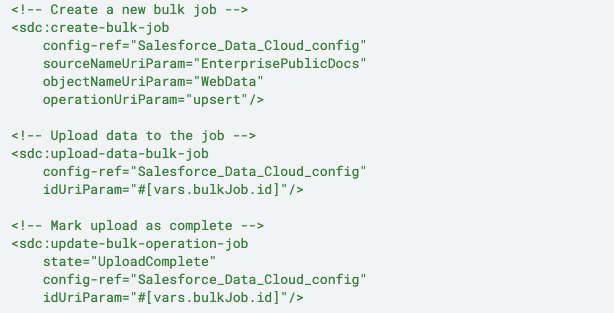
Job state is tracked in MuleSoft ObjectStore, enabling automatic retry on transient failures and clean abort handling on critical errors. The pipeline runs on a cron-based schedule — typically nightly — using configurable timezone settings to align with the documentation team’s update cycle.
Part 4: Augmented RAG with Agentforce
Once documentation is vectorized in Data Cloud, Agentforce uses it as the retrieval source for every agent interaction. The RAG cycle for a customer-facing query proceeds through four stages:
- Query understanding — the agent parses the customer’s intent (e.g., “battery replacement” + “return process”)
- Vector search — Data Cloud retrieves contextually relevant documentation segments using semantic similarity, not keyword matching
- Context augmentation — the retrieved segments are passed to the LLM alongside the original query
- Grounded response — the agent generates an answer based on actual documentation, not training data inference
The distinction between semantic search and keyword matching matters significantly at scale. A customer asking “my device won’t hold a charge” should retrieve battery-related documentation even if the word “battery” does not appear in the query. Vector embeddings capture this conceptual relationship; keyword search does not.
On hallucination prevention: Grounding alone is not sufficient — the retrieval step must surface relevant content. Metadata-rich chunking, accurate vector embeddings, and regular sync cadence all contribute to keeping retrieved content accurate and current. The pipeline addresses each of these.
Part 5: Implementation Best Practices
Content Quality Filters
Not all crawled content is worth ingesting. Filtering at the transformation stage keeps the vector store clean and retrieval accurate:

Sync Scheduling
A nightly sync cadence ensures the agent’s knowledge base stays current without requiring manual intervention:

Error Handling
Production pipelines need fault tolerance. Job status tracking in ObjectStore allows the pipeline to resume from partial failures rather than restarting from scratch. Transient upload failures trigger automatic retry; critical errors abort the current job cleanly without corrupting the existing vector store state.
What to Measure in a RAG Pipeline Implementation
Every RAG implementation will produce different numbers depending on the size of the documentation corpus, the complexity of queries, and the maturity of the metadata schema. The following are the key metrics worth tracking — and what each one tells you about the system’s health.
| Metric | What it measures |
| Retrieval Precision | Are the documents retrieved for a given query actually relevant? Low precision often signals poor chunking or missing metadata filters. |
| Agent Response Time | End-to-end latency from query to grounded response. Baseline against the time a human agent would spend locating the same information manually. |
| Sync Lag | How old is the most recently ingested document? Tracks how current the knowledge base is relative to live documentation. |
| Hallucination Rate | The proportion of responses containing claims not supported by retrieved documents. Typically requires human evaluation or an LLM-as-judge setup to measure reliably. |
Broader Business Indicators
Beyond pipeline-level metrics, the architectural approach should move the needle on these outcomes:
- Response consistency — every agent accessing the same knowledge base reduces variance in answer quality across teams, shifts, and geographies
- Documentation ROI — existing documentation investments become active AI assets rather than passive reference archives; no content needs to be rewritten or reformatted for the agent to use it
- Time-to-knowledge for new content — when a new product launches or a guide is updated, the lag before that information reaches the agent can be measured in hours rather than release cycles
Conclusion
Building an AI agent that reliably knows your products requires more than deploying a capable model. The foundation is a robust data pipeline — one that ingests documentation comprehensively, structures it with rich metadata, keeps it current, and retrieves it with semantic precision.
The combination of MuleSoft’s WebCrawler and Vectors connectors for ingestion, DataWeave for transformation, Salesforce Data Cloud for vector storage, and Agentforce for retrieval creates a system that turns a decade of static documentation into a dynamic, always-current knowledge layer for enterprise AI.
The result is an agent that does not merely respond — it knows the products it supports.
Technical Stack
- MuleSoft Anypoint Platform
- WebCrawler Connector
- Vectors Connector
- Salesforce Data Cloud Connector
- ObjectStore Connector
- Salesforce Data Cloud
- Bulk API
- Vector Store
- Salesforce Agentforce
- RAG-enabled AI Agent
- Custom Components
- Java CSV File Splitter
- DataWeave Transformations
- Cron-based Scheduler