
Think about the last time you integrated with an internal legacy service. Did you spend more time building the integration or hunting for the information from the developer who knew which XML tag was mandatory because the documentation was missing?
Lack of documentation continues to be the main barrier to asset reuse. Without thorough documentation, even robust APIs stay underused, effectively turning your Exchange catalog into a repository of unused APIs instead of a library of reusable assets.
When we first launched Generating API Documentation With Einstein Generative AI, we addressed the API documentation gap for REST APIs, significantly accelerating the documentation process.
To reflect the modern architecture landscape, we are pleased to expand our generative API documentation support to protocols such as SOAP, GraphQL, AsyncAPI, gRPC, MCPs and A2A. You can use AI powered capabilities in Exchange to generate documentation for all assets pertaining to above protocols. By broadening our functional capabilities to encompass the full multi-protocol landscape, we ensure that your Exchange catalog presents a consistent, comprehensive documentation of all the capabilities, regardless of which protocols your org runs.

Protocol-specific intelligence while generating documentation
Documentation needs vary wildly by protocol, and a generic template doesn’t work. AI generated documentation now introduces protocol-aware logic:
- SOAP: Parses WSDL operations and complex request/response XML envelopes. Documents SOAP actions with appropriate namespaces
- GraphQL: Focuses on the graph structures. Documents queries, mutations, and input objects in a way that reflects the hierarchical nature of the schema, not the flat list of the fields
- AsyncAPI: Identifies channels and message payload structures for event driven architectures. Makes publishers and consumer relationships explicit, information that was previously buried inside the spec
- gRPC: Documents Protobuf definitions, including methods and message types. Clarifies metadata and complex fields to provide transparency into unary and bidirectional streaming patterns
- MCP: Documents standardized AI model connections to data sources, systems and applications. Identifies protocol-defined tools, prompts, and resources, so AI agents can seamlessly discover and interact with enterprise data
- Agents: Documents AI agent capabilities, tools, skills and orchestration patterns (like Agent-to-Agent). Makes agent behavior discoverable without requiring a conversation with the team that built them
Multi-file ingestion solves the context gap
Single-file uploads have always left a context gap while generating the documentation. A spec file that references shared schemas and fragments that live elsewhere in the project will produce incomplete output that misses how the API actually behaves. By leveraging ZIP-based uploads, you can provide an entire specification package including all nested schemas, fragments, and libraries rather than just a single file.
Benefits of multi-file ingestion
- Full project awareness: The AI maps relationships across your entire spec package – tracing how a shared RAML fragment or global data type affects endpoints several directories deep, not just the file you uploaded
- Coherent documentation, not endpoint lists: With complete project context, the output reads as a logical guide to how your API works, not a disconnected catalogue of routes
- No manual gap-bridging: Cross-file references are resolved automatically from the package structure. You don’t need to annotate relationships by hand or maintain a separate explanation of how files connect
Before you upload your API specification:
- Validate your spec first: Broken references or circular dependencies in the ZIP cause the AI to fall back to stable paths only, producing partial output without warning. Run the API Catalog CLI validation step before triggering generation
- Clean specs unlock the full context window: A valid specification package allows the AI to use its full LLM context, which directly improves the depth and accuracy of the output
Actionable error messages help in resolving issues
Most of us have experienced a cryptic 500 error on a Friday afternoon and spent the next hour guessing what went wrong. With this release, we replaced ambiguous errors with specific remediation steps when generating documentation. If your Anypoint to Salesforce org connection is misconfigured or if AI document generation hasn’t been enabled at the Org level, the platform gives an error message prompting you to contact MuleSoft to enable it.
How to enable AI-generated documentation
Before generating documentation, your MuleSoft environment needs two configuration steps. Review the full prerequisites before you begin.
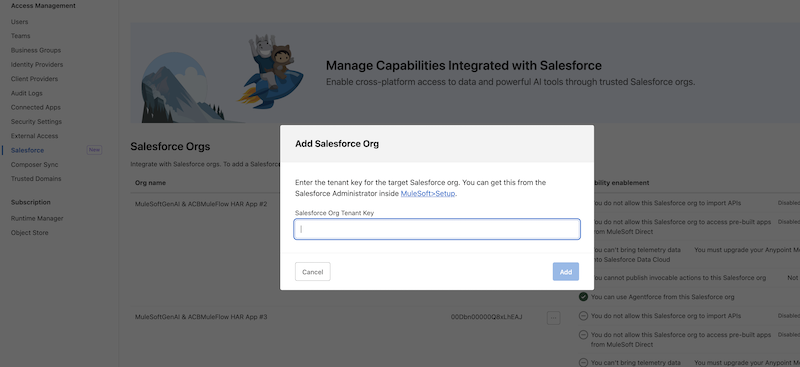
1. Connect your Salesforce Org to the Anypoint Platform
- Go to Anypoint Org settings
- Select Salesforce tab from the left panel
- Click Add Salesforce Org
- Add your Salesforce Org Tenant Key, then click Add
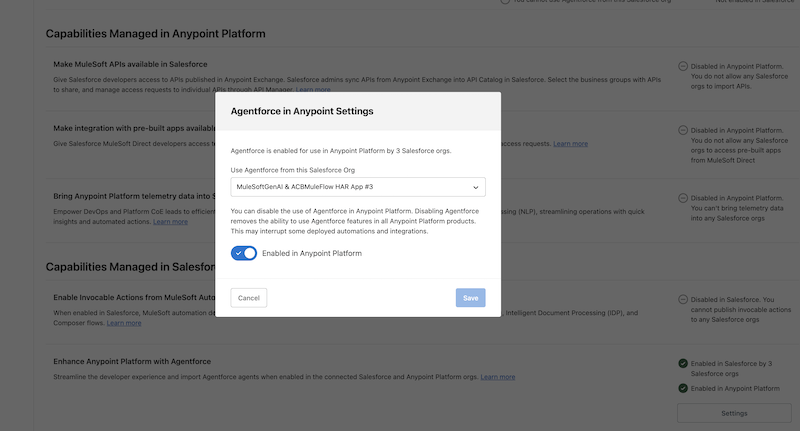
2. Enable Agentforce in your Anypoint org
- In the same Salesforce tab, scroll down to Enhance Anypoint Platform with Agentforce under the Capabilities Managed in Salesforce section
- Click Settings
- In the pop up, select the Salesforce org you want to enable, click enable Anypoint, and then click Save
Make your documentation work for you
The goal isn’t more documentation – it’s documentation that makes your assets discoverable and reusable. Whether you’re covering a SOAP service no one has touched in three years or a new A2A agent shipping next sprint, AI doc generation handles the write-up. You focus on building. To learn more, watch AI-Generated Documentation in Exchange demo and read the Generating API documentation.


