
Platform teams using AI agents see token costs grow when models repeatedly process large tool catalogs or oversized tool responses. However, identifying which traffic causes that spend and reducing it can be difficult without changing servers or client applications that you do not own.
In June 2026, we launched Cost Management in enhanced experience to address this problem. In this new release, we are expanding our cost reduction strategies to agents controlled through MuleSoft’s AI Gateway (LLM Proxies) by introducing three new policies.
We initially debuted Tool Mapping, which compresses verbose tool schemas, and Payload Optimization, which trims oversized tool responses. Our three new policies extend these original policies:
- Smart Response Trimming extracts the part of a large response that is relevant to the current request.
- Tool Progressive Disclosure replaces a large tool catalog with on-demand discovery.
- Compressed Repeated Structures converts repetitive JSON into a more compact tabular representation.
In addition to the new policies, we built a validation harness that runs through the same production path a customer would use . The harness concretely measures the policies’ impacts on token usage, task completion, answer quality, and latency.
The results are encouraging, but they also make one limitation clear: none of these optimizations are a universal discount. Each works well on a specific traffic shape, but can add cost when applied to the wrong server.
Where AI Token Costs Come From
An agent with access to tools repeatedly pays for two kinds of context. First, the model parses the available tool catalog: tool names, descriptions, and input schemas. An MCP server with dozens of tools may add tens of thousands of tokens before the agent has taken any action.
Second, the model is responsible for processing the results of the tools it calls. Those responses may contain far more information than the task requires, or present information in an inefficient format. The conversation history is re-passed to the model on each turn, as highlighted below, meaning these runaway costs compound as conversations grow longer.
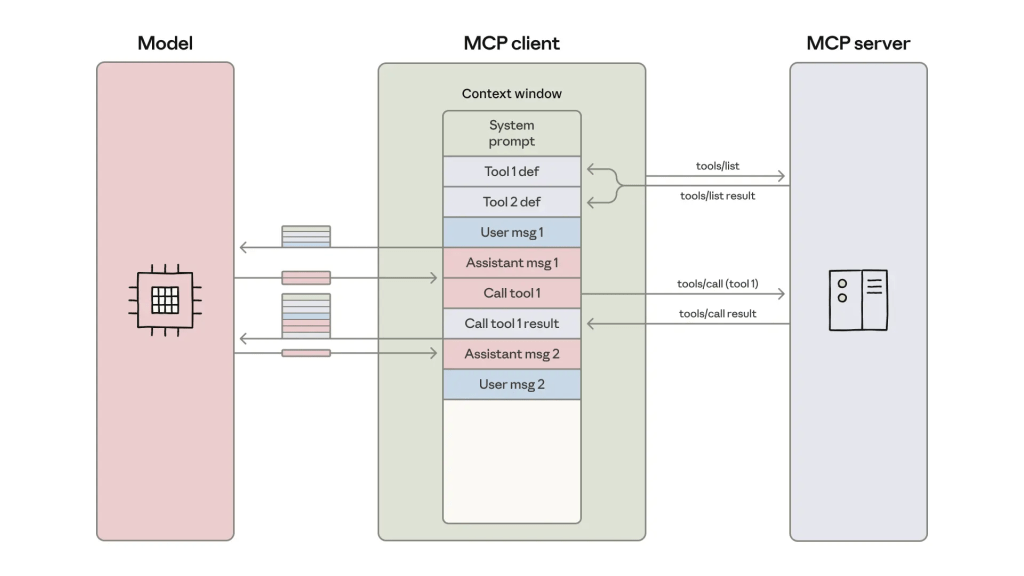
Image Source: Anthropic “Code execution with MCP: Building more efficient agents“
By minimizing responses before they ever make it to the LLM, our policies reduce token spend before it has the chance to snowball. Let’s take a look at each policy.
In the June launch, the cost management policies purely focused on MCP Servers. The AI gateway policies trims the tool response, irrespective of who owned the model. This means teams could route their MCP traffic through the AI gateway, send their model calls straight to any upstream LLM provider, and still get the full reduction.
In this release, we introduced optimizations at the LLM layer itself. By optimizing tool responses as they go into the LLM, we centralize the configuration into a single location and expand our optimizations to all tool calls, including outbound requests to other agents or built-in tools from the agent runtime. Furthermore, because we are operating at the model layer, we know the exact model being used and its costs, enabling us to report dollar prices rather than token aggregates.
New Policies
Smart Response Trimming
The smart response trimming policy is designed for verbose, text-heavy responses where only a small subset of the returned information matters to the user’s request.
The policy injects an additional expected_info parameter directly into each tool’s existing input schema. When the invoking agent reads the tool definition, it treats expected_info as any other parameter and provides a natural language query about what it is looking for.
Consider an example from our benchmarking with the Salesforce AI Research team. When the agent queries the GitHub MCP server’s tool list to search for issues, it finds the search_issues tool and invokes it with the new parameters:
{
    "query": "How many issues in the last year have had issues with deployment",
    "owner": "trailheadapps",
    "repo": "agent-script-recipes",
    "expected_info": "The number of issues in the last year with deployment issues"
}
Using that guidance, our summarizer agent is able to reduce the original response,
{
  "total_count":6,
  "incomplete_results":false,
  "items":[
    {
      "id":4416618502,
      "number":98,
      "state":"closed",
      "state_reason":"completed",
      "locked":false,
      "title":"Unable to deploy",
      "body":"### Summary\n\nHello,\nI am trying to deploy the project on a new org without success.\n\n\n\n\n\n### Salesforce Org Type\n\nDeveloper Edition Org\n\n### Steps To Reproduce\n\n1. Connect Org\n2. Run deploy with : sf project deploy start -d force-app\n\n### Current Behavior\n\nFailed deploy with a lot of error\nAll of the errors are in the follwoing CSV file\n[errors.csv](https://github.com/user-attachments/files/27572897/errors.csv)\n\n### Expected Behavior\n\n_No response_\n\n### Relevant Log  ─────────────┤\n│ AiAuthoringBundle │ ActionChaining/ActionChaining │ Not available for deploy for this organization │ │\n│ AiAuthoringBundle │ ActionChaining/ActionChaining │ Not available for deploy for this organization │ │\n......continues for 38,693 characters with avatar URLs, event endpoints, subscription URLs, and five more issues."
    },
    { continues for 36,683 characters with avatar URLs, event endpoints, subscription URLs, and five more issues.
  }]
}
Into a much more succinct version:
Based on the search results, there are 6 total issues in the repository.
Of these, 4 issues are related to deployment problems:

1. Issue #98 (Closed) - "Unable to deploy" - Created 2026-05-10, deployment
   failures with AiAuthoringBundle and GenAiPromptTemplate components
2. Issue #83 (Open) - "Unable to test Custom Lightning Type Agent in Namespaced
   Scratch Orgs" - Created 2026-04-29, compilation error when deploying to
   namespaced scratch orgs
3. Issue #66 (Closed) - "Unable to Deploy the App to Org" - Created 2026-03-15,
   deployment limit error
4. Issue #41 (Closed) - "The deployment of recipes fail in latest sandbox due to
   missing default_agent_user" - Created 2026-01-09, deployment failure due to
   missing default_agent_user configuration

Additionally, Issue #58 (Open) and Issue #74 (Closed) are related to deployment/configuration concerns but are categorized as enhancements rather than pure deployment bugs.
The primary agent thus receives 928 characters instead of the original 38,693, marking a 97.62% reduction! Our approach builds on Salesforce AI Research’s MCP-Universe work and their MCP+ extension. You can read more about MCP+ specifically in the research team’s own blog here. This policy is only available for MCP Instances today.
Tool Progressive Disclosure
Vanilla MCP Clients send all available tools from the MCP server directly to the model. This is simple, but it scales poorly. If a server exposes 60 tools and the current task only needs one, the model still reads all 60 descriptions. For a verbose server like the GitHub MCP, this could cost tens of thousands of tokens before any user message is processed. At production usage levels, this quickly compounds into an expensive line item.
Tool Progressive Disclosure replaces the original catalog with two stable meta-tools:
- search_tools, which searches the caller’s available tools
- invoke_tool, which invokes one of the returned tools
For example, an agent working against the GitHub server that needs to submit its changes for review might first call:
{
  "name": "search_tools",
  "arguments": {
    "query": "pull request branch merge"
  }
}
The policy returns a small set of relevant tools rather than the full catalog. When the model later calls invoke_tool, the gateway rewrites that call into the original MCP tool invocation before forwarding it upstream. The MCP server and any policies later in the chain therefore see the native tool name, not the abstraction used for discovery.
Tool Progressive Disclosure works best for servers with large tool catalogs and in settings where the MCP Client does not already defer tool loading. This policy is only available for MCP Instances today.
Compress Repeated Structures
The MCP standard is built on top of JSON-RPC, employing it for tool definitions and results. While JSON is the typical serialization format, it becomes inefficient when tools return large arrays of similarly shaped records or other tabular data. In these situations, JSON repeats field names and structural syntax for every object, unnecessarily consuming tokens.
To combat this, we adopted Token-Oriented Object Notation, or TOON, for our compression policy. TOON represents uniform arrays as compact tables, declaring the schema once and encoding each object as a row of values. TOON works best for servers that respond with large uniform arrays of objects or repeated schemas across many records.
For example, consider a cryptocurrency’s listing of tokens:
[
  {"symbol": "BTC", "price": 118432.12, "change_24h": 1.8},
  {"symbol": "ETH", "price": 3614.44, "change_24h": -0.6},
  {"symbol": "SOL", "price": 182.09, "change_24h": 2.4},
  { ... }
]
The same information in TOON can be represented as:
symbol,price,change_24h
BTC,118432.12,1.8
ETH,3614.44,-0.6
SOL,182.09,2.4
[ ... ]
We can see that the JSON representation is 184 characters while the TOON representation is 77, marking a 58.15% reduction. TOON translation does not involve an LLM, which makes the transformation deterministic, inexpensive, and fast.
The Compressed Repeated Structures policy is available for MCP and LLM Instances today.
What comes next
MCP catalogs and tool responses are only part of an agent’s token cost. The model it selects, the prompts it sends, the conversation history it retains, and the number of turns it takes account for a large share as well.
This release laid the groundwork for more extensive optimizations at the LLM layer. We are excited to continue researching new strategies for effective AI usage in pursuit of giving platform teams a way to measure and reduce agent costs.
To get started, navigate to the Cost Management in MuleSoft’s enhanced experience. There, review the Top Opportunities identified for your traffic, apply a recommended policy to an MCP or LLM instance, and compare token usage with your current configuration.


